What Is an AI Workspace? (And Why It Beats Another AI Tool)
An AI workspace is where agents learn your real work and you approve every step. Here's the definition — from people actually building one.
Jason Workweb · June 10, 2026
Search "what is an AI workspace" and you'll get some version of the same answer: a digital workspace with AI bolted on. Notes that summarize themselves. Meetings that transcribe themselves. A chat box next to your docs.
That's not a workspace. That's a tool with a feature list.
Here's the definition we're building toward, and the one we think the category deserves:
An AI workspace is where you teach agents to do your real work — and stay in charge of every step.
Not where AI summarizes what already happened. Where work actually gets done. The rest of this post is what that means in practice, why it's different from buying another AI tool, and — because we're building one — what's genuinely hard about it.
The definition most people get is "AI features in a document"
The current crop of "AI workspace" definitions describes a familiar product: take a notes app, a doc editor, or a meeting tool, and wire a model into it. The AI drafts, summarizes, transcribes, suggests. You still do the work; the AI comments on it.
That's useful. It's also not a different way of working — it's the old way of working with a faster autocomplete. The unit of value is still you, producing the document.
And it leads directly to the problem everyone with a software budget already knows: tool sprawl. Another tab. Another subscription. Another thing to configure, another place your work lives, another login your team forgets. Each tool automates a thin slice of somebody's job — rarely yours — and the slices don't add up. You can have a dozen AI tools and the same throughput you had before any of them.
If "AI workspace" just means "the tab where the AI features are," the term is marketing. The category needs a harder definition.
A real definition: the teach loop
What separates a workspace from a tool is whether the system can learn your work — not a template of someone's work, yours — and then do it while you stay in command. Three parts:
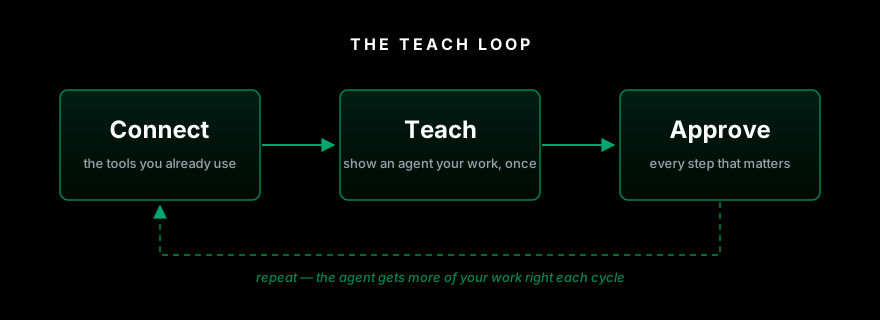
Connect. Your work doesn't live in one app, so the workspace can't either. It plugs into the places your work already happens — email, docs, spreadsheets, your CRM, your codebase — instead of asking you to move everything into a new silo. If you have to migrate your work to use it, it's not a workspace. It's a destination.
Teach. This is the part that defines the category. You show an agent how you do a real task — how you research a prospect, build the weekly report, triage the inbox, draft the outreach — and it learns that, your version, with your judgment calls baked in. Not prompt engineering. Not fine-tuning a model. Not configuring a workflow builder with seventeen trigger conditions. You demonstrate the work once, the way you'd show a new hire, and the agent does it your way from then on.
Approve. The agent does the work; you sign off on it. Every step that matters comes back to you before it ships — the email before it sends, the report before it posts, the change before it lands. Approval isn't a safety disclaimer bolted on for the lawyers. It's the actual interface. It's what makes it sane to hand real work to an agent at all.
Teach, run, approve, repeat. Each cycle the agent gets more of your work right, and you spend less time on the repetitive part and more on the judgment part. That loop — not the chat box, not the summaries — is what makes something an AI workspace.
Why this beats buying another AI tool
A tool automates a task. A workspace learns your work. Tools come with the work pre-defined: this one does meeting notes, that one does email drafts. If your job matches the template, great. Real work mostly doesn't — it's specific, full of context and exceptions and a hundred small judgments that live in your head, not in a settings page. A workspace inverts it: the work is whatever you teach.
Tools make you adapt. A workspace adapts to you. Most AI products quietly ask you to do the adapting — learn the prompt tricks, restructure your process to fit their workflow, accept their template as your template. That's the tax behind the AI productivity paradox: adoption went vertical, output didn't, because every tool offloaded the fitting-in work onto the user. Teaching reverses the direction. The system molds to how you already work.
Automation asks for trust. Approval earns it. The classic automation pitch is: set it up, let go, hope it guessed right. Nobody actually wants that for work that matters — which is why so many automations get built, fire wrong twice, and get turned off. An agent that shows you its work before anything ships is one you can hand bigger things to. Control isn't the brake on this category. It's the engine.
One workspace compounds. Ten tools fragment. Every task you teach makes the workspace more yours. Every additional point tool makes your stack more fragmented. One of these gets better with use; the other gets more expensive.
The honest part: what's hard about building this
We're building an AI workspace, not reviewing one, so here's what the brochure version skips.
Teaching has to actually be easy, or the whole pitch collapses. "Show it once" is a high bar. If teaching an agent degrades into writing configuration — prompt files, workflow diagrams, trigger rules — you've rebuilt the automation tools you were escaping, with extra steps. Most of the engineering in this category is making demonstration, not configuration, the way agents learn. We don't think anyone, including us, has fully solved it. It's the right problem to be working on.
Approval has to inform, not interrupt. An approval step that just says "the agent did 47 things, OK?" is a rubber stamp. One that makes you re-review everything is slower than doing it yourself. The craft is in showing exactly what changed and what's about to happen, so a real decision takes seconds. Get it wrong in either direction and people switch it off — and then you're a black box like everything else.
Agents are inconsistent, and pretending otherwise is how this category loses trust. Models fail in ways that are occasionally absurd. A workspace built on them has to assume that: review gates, visible steps, easy undo. The honest pitch is not "it never makes mistakes." It's "you'll catch the mistakes before they matter, and it'll make fewer of them on your tasks every week, because it learned them from you."
The economics should flow to you. The models underneath this are getting cheaper at a startling rate — and the price of most AI products somehow isn't following. The model is becoming a commodity; the markup isn't. Our bet is that the lasting value sits in the workspace — the place where agents have learned your work and you hold the controls — and that as the underlying intelligence races toward free, the product's price should chase it down. Free. Fair. Forever.
So: what is an AI workspace?
It's not AI features stapled to your documents, and it's not another automation tool asking for blind trust.
An AI workspace is the place where agents learn your real work — taught by you, run by them, approved by you — connected to the tools you already use, built on AI that gets cheaper every month.
If the thing you're evaluating doesn't learn your work, it's a tool. If it won't show you its work before acting, it's a gamble. The category only deserves a new name because it's a new deal: you stop adapting to the software, and the software starts adapting to you.
That's the workspace we're building.
Connect. Teach. Unleash.